


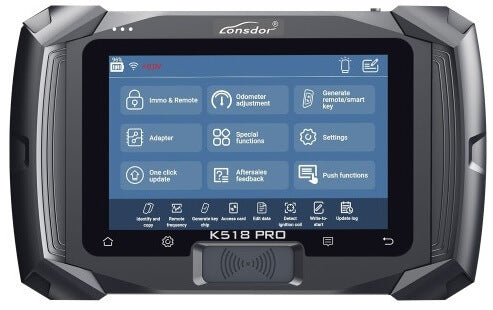
Lonsdor K518 Pro key programmer Guide & Device Functions & Features
In this Article we will talk about the Lonsdor K518 Pro key programmer Guide ABK-4238, and we will explain more details about the device functions and features
The Lonsdor K518 Pro is a versatile key programming tool designed for automotive locksmiths. It supports a wide range of vehicle models and offers a variety of functions from key programming to odometer adjustment. This guide will help you with the registration process and provide an overview of its functions, special features, system settings, and operation interface.
Lonsdor K518 Pro is on Sale Now from ABKEYS You can Buy it now from here:
How to Register The Lonsdor K518 Pro
- Start: Boot the K518 Pro tablet and connect to an available Wi-Fi network via "Settings" > "Wi-Fi settings".
- Registration & Activation: Navigate to the registration and activation section, where you'll be prompted to enter your username, password, mobile number, or email to receive a verification code. Enter the code and submit your registration.
- Account Setup: Successfully register your new account and set the device’s power-on password. Submit your information to bind your account to the K518 Pro key programmer.
- Verification: The server will verify your details. Once the registration is successful, initialize the menu and other settings.
- Reboot: Finally, reboot the device and enter the system to start using the supported functions.
Lonsdor K518 Pro Functions Instructions:

The K518 Pro offers a comprehensive range of functions to meet the needs of modern automotive locksmiths. Here's a breakdown of its capabilities:
| Function Category | Description |
|---|---|
| Immo & Remote | Programs mechanical keys, smart keys, remotes, and supports a vast majority of vehicle models. Regularly updated to include new models. |
| Odometer Adjustment | Provides mileage diagnosis and correction for specific models. |
| Generate Remote/Smart Key | Generates smart keys for some models and remote keys for most vehicle models, including garage door remotes. |
| Adapter | Enables reading and writing EEPROM chips, CPU main control chips, EEPROM Pin codes, etc. |
| Special Functions | Offers a variety of functions like key chip identification and copying, key chip generation, remote frequency detection, chip simulation, chip decoding, IMMO coil detection, key settings, and access control card management. |
| Push Functions | Delivers designated function programs to users, with automatic expiration. Functions not opened or activated can be requested. |
| OBD Illumination | Allows the OBD cable connector's light to be switched on/off. |
| Aftersales Feedback | Enables users to report problems encountered for support. |
| Message Board | Displays replies to user feedback and allows for further inquiries. |
Lonsdor K518 Pro Special Functions Instruction:

| Special Function | Description |
|---|---|
| Generate Key Chip | Supports generating specific car key chips for 4D, 46, 48, 7935, 8A, and more. |
| Identify/Copy Chip | Identifies key chip information and status for almost all cars on the market. |
| Remote | Detects the frequency of the remote key. |
| Simulate Chip | Includes LKE functions such as simulating 4D/46/8A chips, binding LKE, and obtaining LKE info. |
| Decode Chip | Supports decoding for 46 and 4D chips. |
| IMMO Coil | Detects signal from the Immo coil and identifies the key type in AKL (All Keys Lost) situations. |
| Key Settings | Allows setting of Lonsdor 8A and 4D smart key types. |
| Unlock Key | Unlocks Toyota 8A smart keys. |
Lonsdor K518 Pro System Settings Interface Instructions:

| System Setting | Description |
|---|---|
| Wi-Fi settings | Configure and connect to Wi-Fi networks. |
| Ethernet | Displays the Ethernet card status, network connection status, MAC/IP address, and other network details. |
| Bluetooth settings | Manages and sets Bluetooth connection status. |
| Brightness and sound | Adjusts screen brightness and sets the auto-off screen time. |
| Start record | Initiates recording or closes demo video. |
| Device info | Provides access to device ID, PSN, hardware/kernel version, and other device information. |
| Screen test | Conducts a touch screen diagnostic test. |
| Firmware upgrade | Includes APK updates, kernel upgrades, and more for system enhancements. |
| Reset device | Resets the device to address issues like program errors, system crashes, and communication failures. |
| File manager | Manages and views files stored on the device. |
| Network test | Tests the network connection when it is unstable. |
Lonsdor K518Pro Function Operation Interface Instructions:

| Interface Feature | Description |
|---|---|
| Function | Illustrates each function along with necessary tips for certain operations. |
| Operation | Provides a concrete guide for each step, including pictures and notices where necessary. |
| Attention | Highlights tips and notices for functions, emphasizing aspects users might overlook during operation that could lead to program failure. |
| Reference | Offers basic information such as chip type, frequency, key embryo number, PIN code requirement, car photo, OBD position, and other related information. |
| QR Code | Enables scanning of QR code to view help instructions while programming a key. |
| Demo | Records demo and user record processes for reference. |
| Feedback | Allows timely feedback on function problems. |
| Version | Detects the latest version of the current interface function to ensure up-to-date operation. |